Skip to content
Request a demo
Language

01 / 06 · The yard

Fleet module

No vehicle leaves
with a critical defect.

Inspection before every trip from the driver’s phone, repairs signed by a supervisor, documents that warn before they expire. The fleet and the plant in one system.

Request a fleet demo

02 / 06 · Inspection

Before every trip

The driver inspects the unit from the phone.

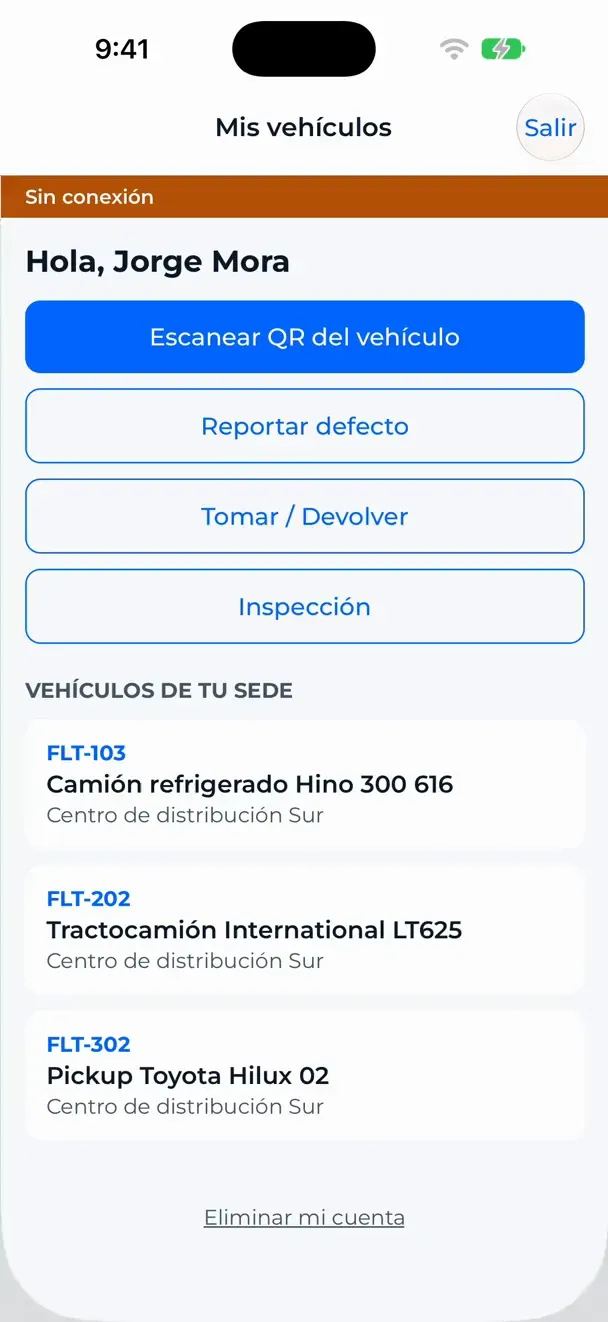
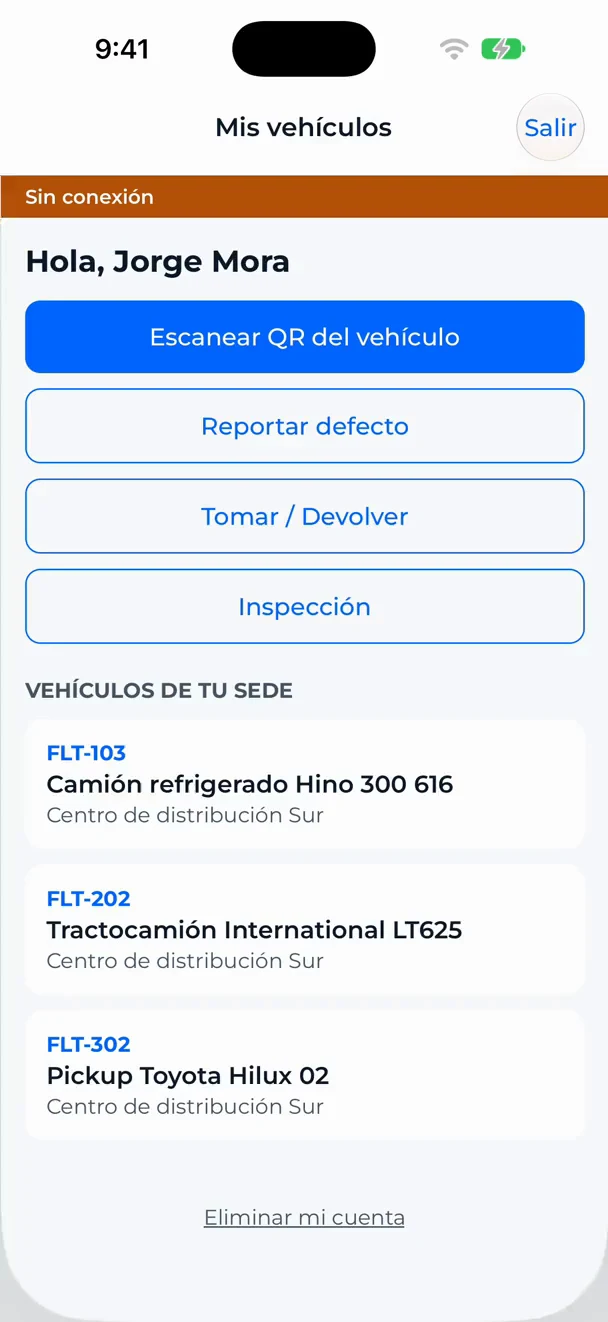
A checklist made for each type of vehicle, with the photos it asks for, the odometer and the signature. It works without signal and syncs on its own.

  • Templates per vehicle type
  • Required photos
  • Works offline

03 / 06 · Defect

A critical defect

The unit stops right there.

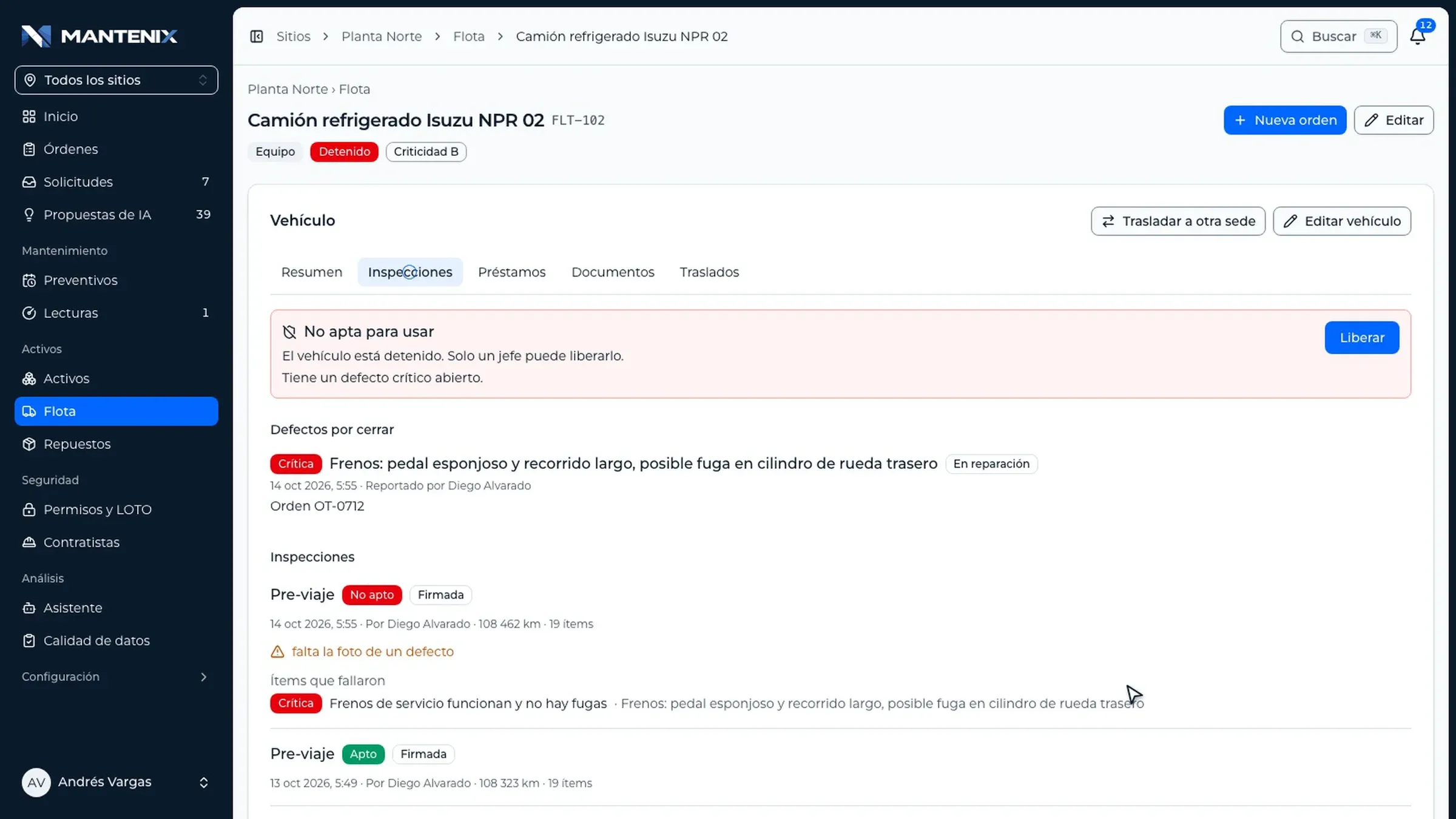
The brakes fail the check. The vehicle is marked not fit to use and cannot be taken out until a supervisor releases it.

  • Not fit to use
  • Defect with photo
  • Block, warn or ignore, per company

04 / 06 · Repair

Repair with a signature

The repair order opens on its own.

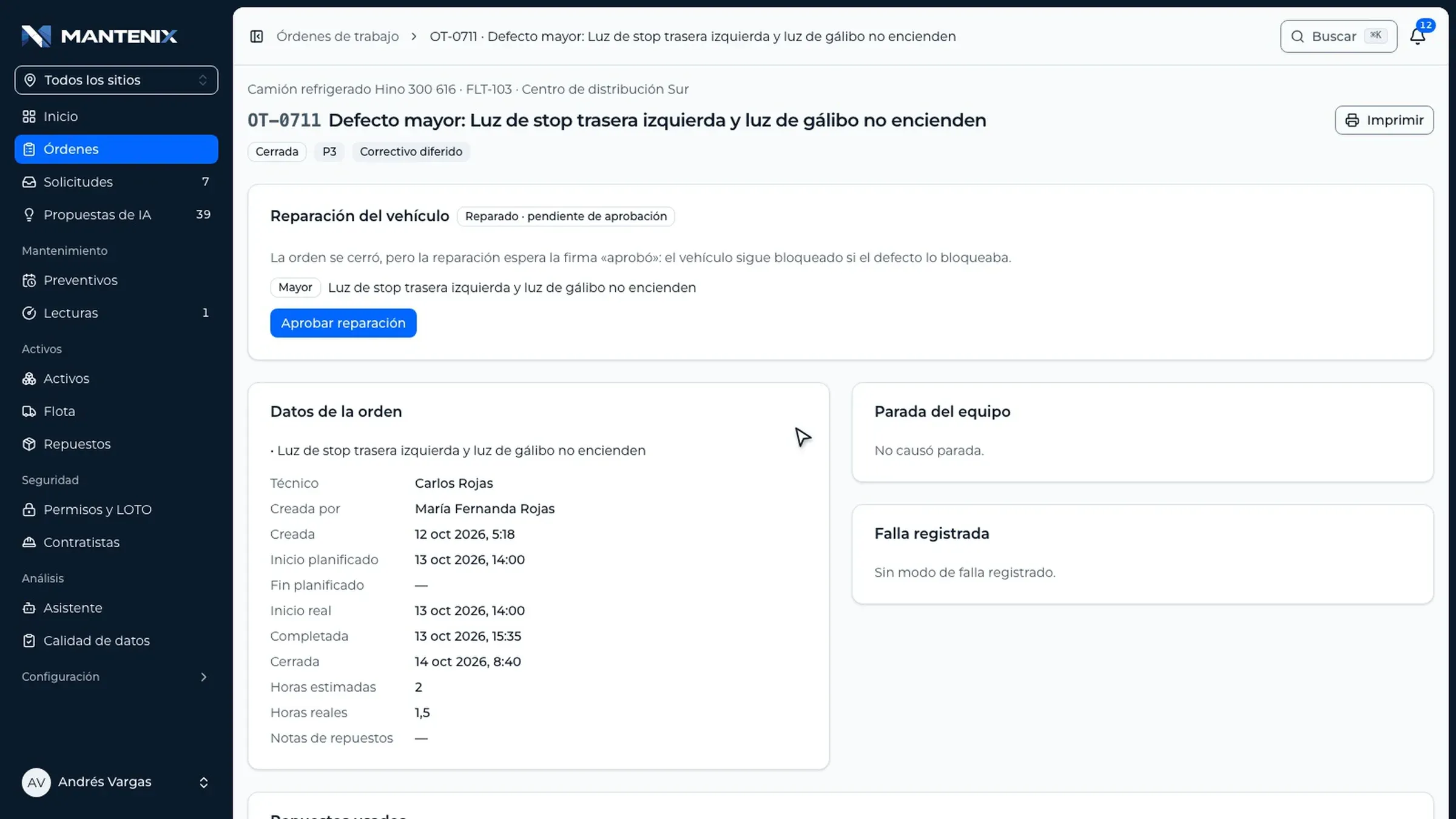
The defect becomes a work order with its vehicle and priority. When the repair is done, a supervisor signs it, and whoever did the work cannot approve their own repair.

  • Order created from the defect
  • Approval signature
  • Configurable per company

05 / 06 · Back on the road

Fit to use

Back on the road, with the record closed.

The order closes, the defect is marked corrected and the unit is available again. Every step stays in the vehicle’s history.

  • Defect corrected
  • Full history per vehicle
  • Loans: who has it now

06 / 06 · Dashboard

Fleet dashboard

The whole fleet on one screen.

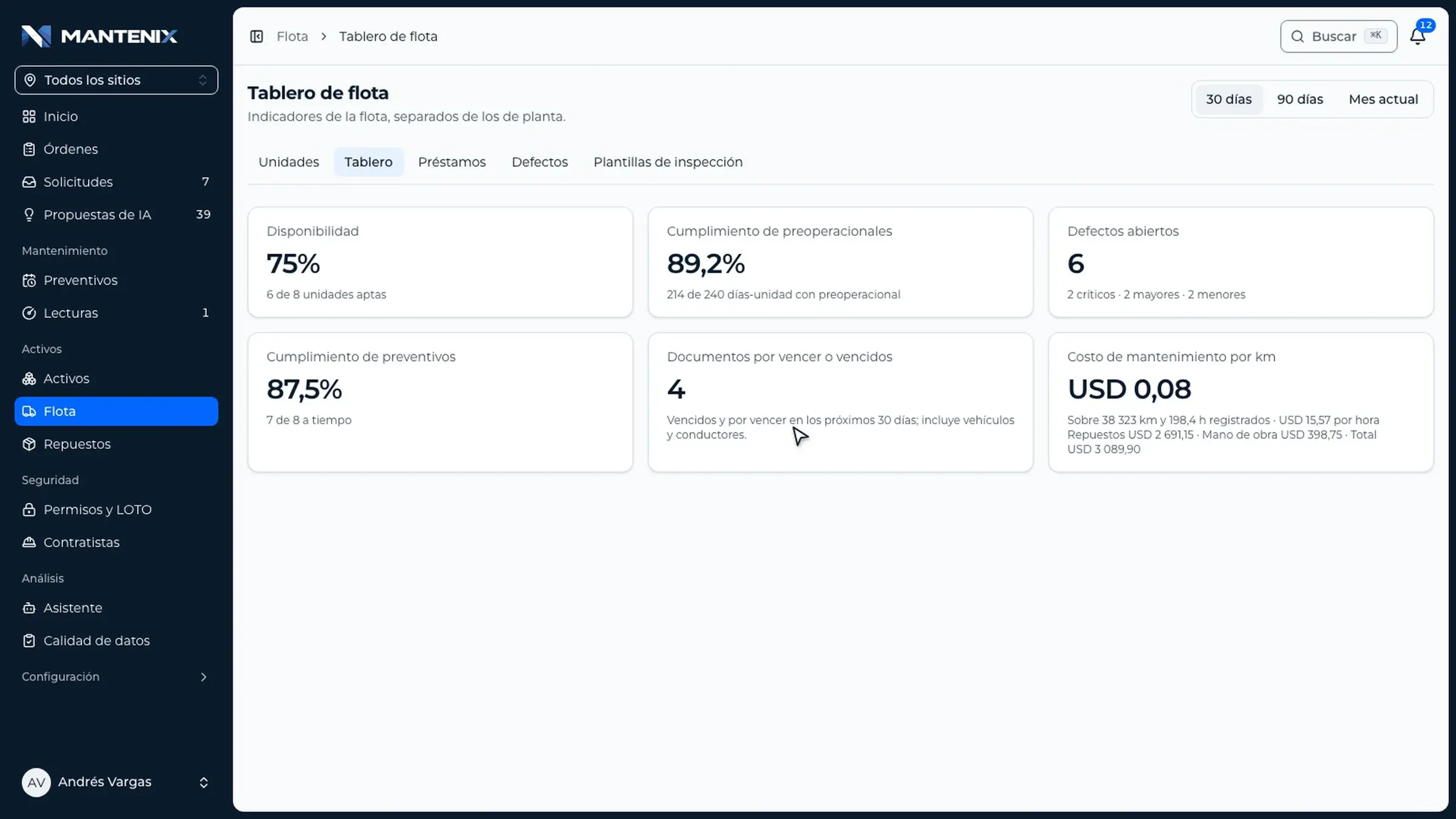
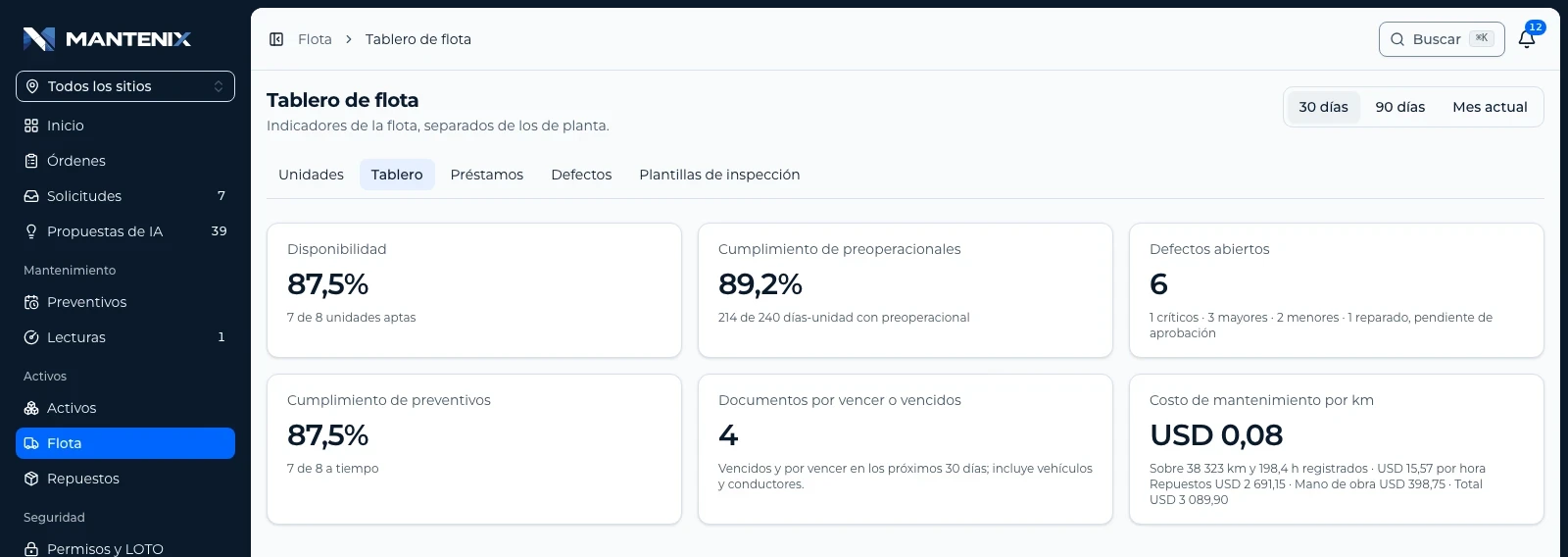
Availability, pre-trip compliance, open defects, preventive compliance, documents about to expire and maintenance cost per kilometer.

  • Six indicators
  • Per site or for every site
  • Separate from the plant’s
Skip the journey

The problem

The fleet is still checked on paper.

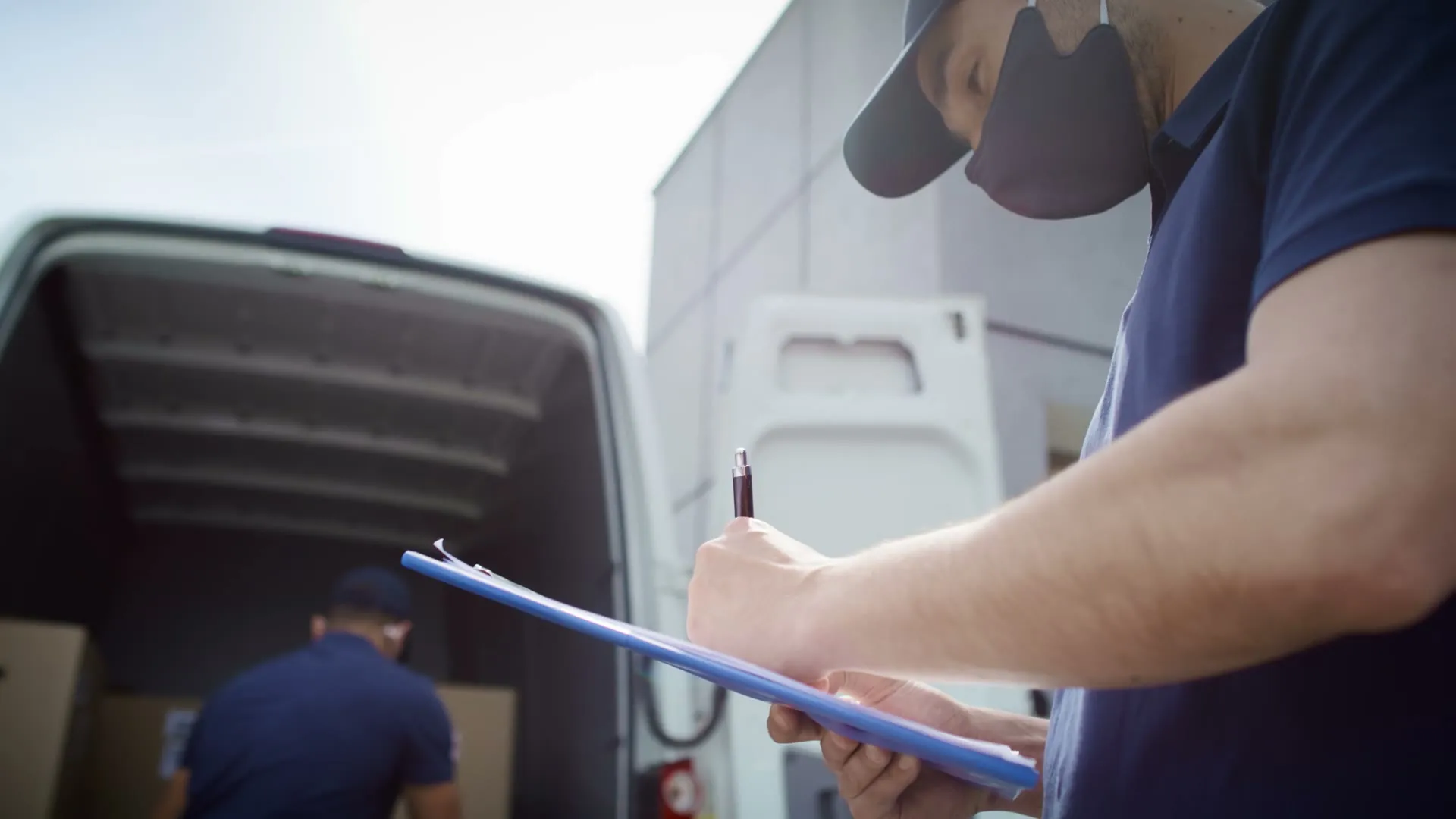
The inspection exists, but it lives on a clipboard. Nobody sees the failure until the truck is already on the road.

  • A delivery driver signs a paper form on a clipboard next to the open door of a van.

    Checklists nobody reads

    The driver fills in the form, it stays in the cab, and the maintenance team hears about the failure days later.

  • A truck driver in the cab reviews paper documents before leaving.

    Documents that expire unnoticed

    Insurance, technical inspections and licenses are tracked in a spreadsheet, until a unit gets stopped on the road.

  • A yard supervisor in a hard hat holds a clipboard next to the trucks.

    Units that leave with known failures

    Without a rule that stops the vehicle, a critical defect depends on someone remembering it.

What it does

Everything a fleet needs to leave on time.

Real screens from Mantenix with demo data.

An inspection that cannot be skipped.

Pre-trip, post-trip or periodic, with a template for each type of vehicle. Every failed item asks for its photo and its note.

  • From the phone, with or without signal
  • Odometer, photos of every side and the dashboard
  • Signed by the driver
Field app without signal: the driver goes through the pre-trip checklist of a tractor unit and marks a failed light with its required photo.

A critical defect stops the vehicle.

The unit shows as not fit to use on the web and in the app. Only a supervisor can release it, and each company decides whether critical defects block, warn or are ignored.

  • Critical, major and minor defects
  • Not fit to use until the repair
  • Release by a supervisor only
Record of a refrigerated truck marked as stopped and not fit to use, with an open critical brake defect and its pre-trip inspections.

The repair, approved by someone else.

Each defect opens its work order. On close, a supervisor signs the repair, and the person who did the work cannot approve it.

  • Work order created from the defect
  • Parts and hours on the order
  • Approval signature, optional per company
A closed work order for a vehicle defect with the repair approved by a supervisor, its data and the parts used.

Every document with its expiry date.

Vehicle documents and driver licenses with warnings before they expire. The types of document are set up for your country.

  • Warnings before the due date
  • Vehicles and drivers
  • Expired documents can block the loan
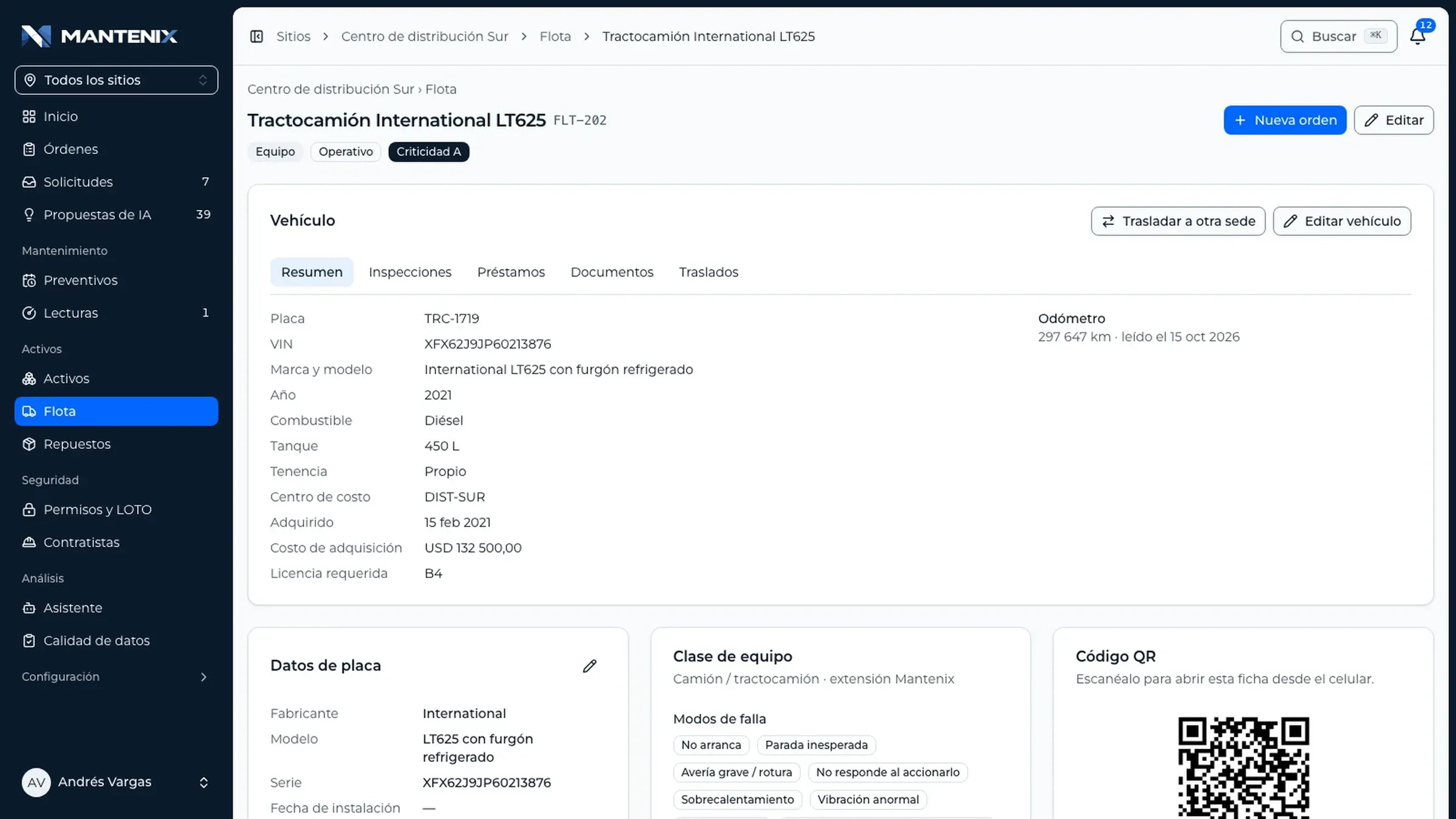
Documents tab of a tractor unit: technical inspection, circulation permit and insurance policy, each with its number, due date and status.

Who has each vehicle, right now.

Take and hand over a vehicle from the app, with fuel level and odometer. Late returns and handovers with warnings stand out.

  • Driver, departure and expected return
  • Late loans flagged
  • History per vehicle and per driver
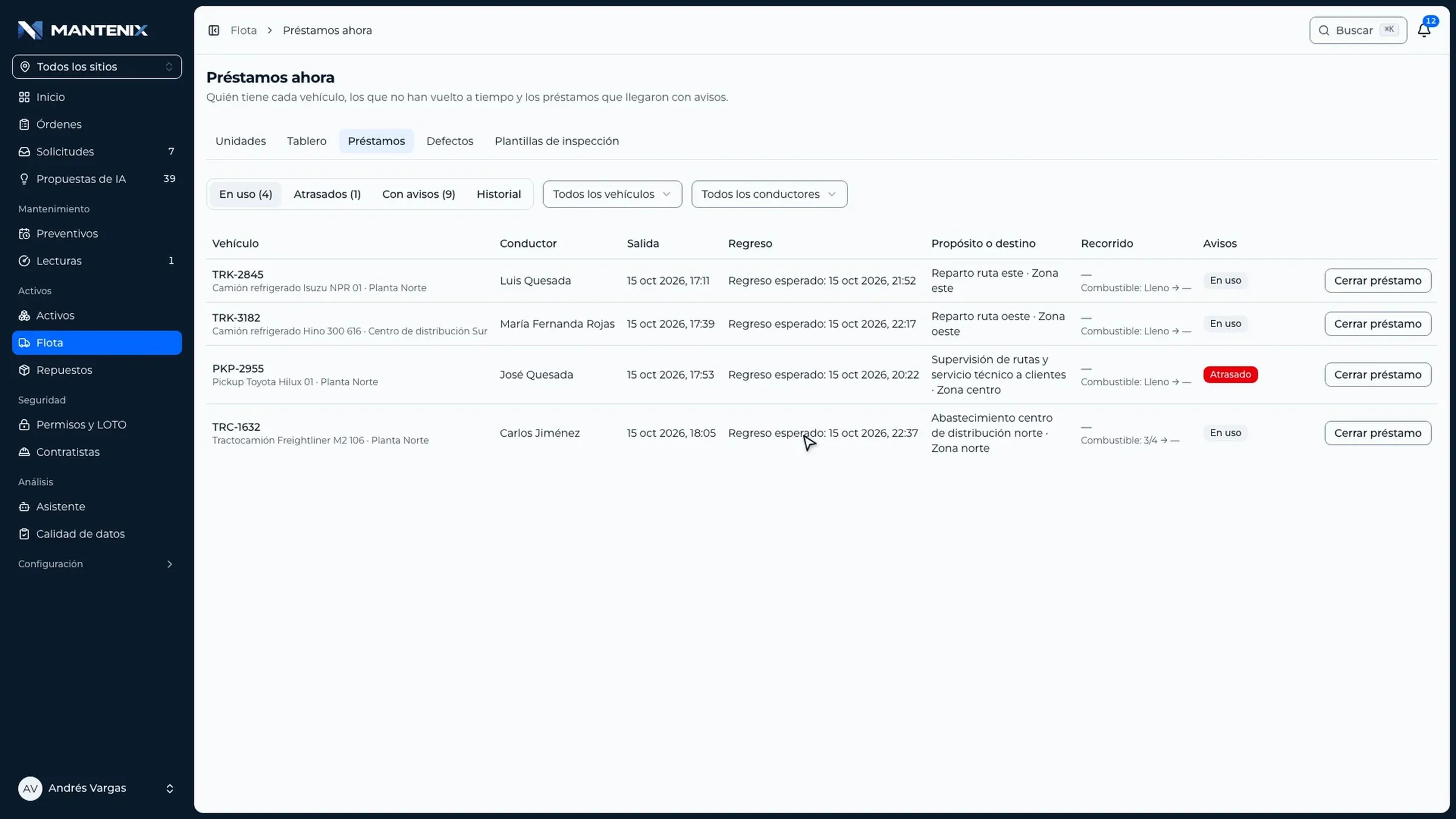
Loans now: the vehicles in use with their driver, departure, expected return and destination, and one loan marked late.

Fleet indicators, separate from the plant’s.

Six indicators from real records, for 30 days, 90 days or the current month, per site or across every site.

  • Availability and open defects
  • Pre-trip and preventive compliance
  • Maintenance cost per kilometer
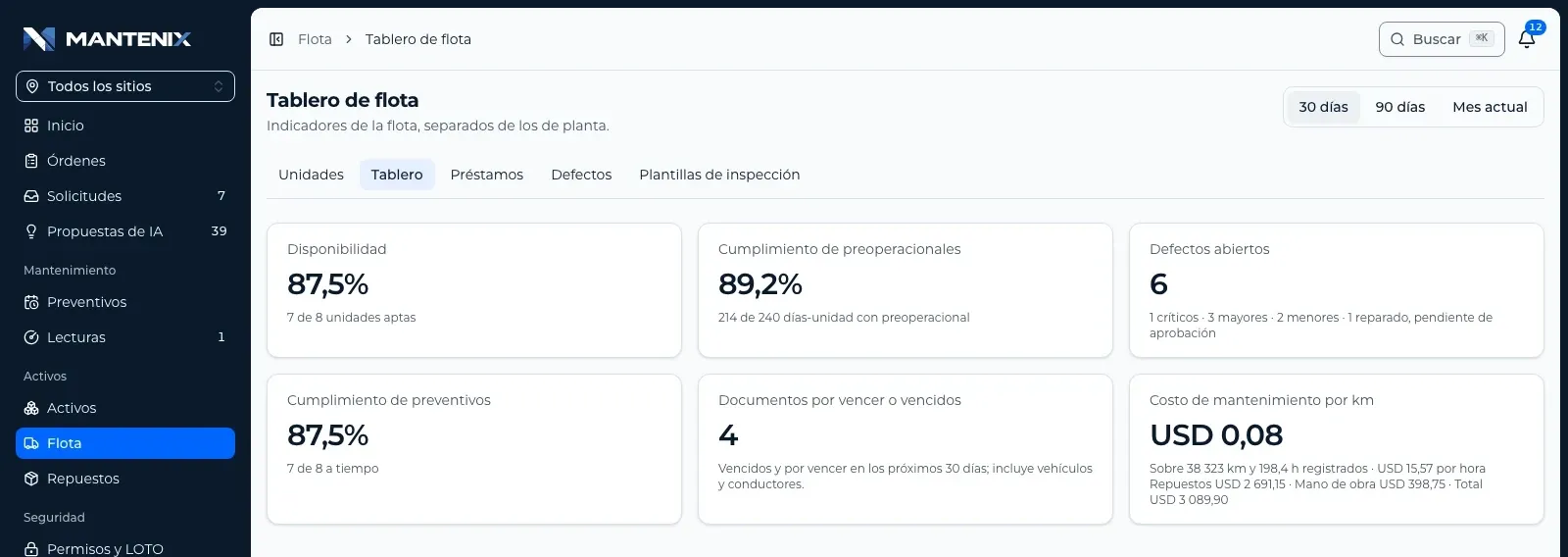
Fleet dashboard: availability, pre-trip compliance, open defects, preventive compliance, documents about to expire and maintenance cost per kilometer.
  • Transfers between sites

    A unit moves to another site with its whole history: orders, plans and readings.

  • Templates per vehicle type

    Trucks, vans, pickups or forklifts, each with its own checklist.

  • Fleet and plant together

    The same work orders, parts warehouse and technicians for vehicles and equipment.

Who uses it

One record for the driver, the supervisor and the manager.

  • A driver in an orange high visibility vest at the wheel of a truck.

    Driver

    Inspects and reports from the phone.

    • Sees whether the unit is fit before taking it
    • Inspection with photos, even offline
    • Reports a defect in seconds
  • A fleet supervisor in a hard hat and safety vest reviews a tablet next to a truck.

    Fleet supervisor

    Releases, assigns and approves.

    • Defects to review, by severity
    • Releases the unit after the repair
    • Signs the repair and the loans
  • An operations manager reviews a tablet in a yard with trucks behind her.

    Operations manager

    Sees availability and cost.

    • Availability per site
    • Documents about to expire
    • Maintenance cost per kilometer

Documents per country

The types of document adapt to your country.

Every country names its vehicle documents differently. In Mantenix each company sets up its own types for vehicles and for drivers, with the warning time it needs.

Examples of document types

  • Technical inspection
  • Insurance policy
  • Circulation permit
  • Emissions certificate
  • Driver’s license
  • Hazardous goods permit
  1. Valid

    The document is on file with its number and due date.

  2. About to expire

    The fleet supervisor gets a warning ahead of time.

  3. Expired

    Depending on the company, the loan warns or the unit stays in the yard.

Fleet dashboard

Six indicators, from real records.

Nothing typed at month end: every indicator comes from inspections, defects, orders and readings.

Availability
Units fit to use over all active units.
Pre-trip compliance
Unit days with their pre-trip inspection done.
Open defects
Defects still open, by critical, major and minor.
Preventive compliance
Fleet preventive work done on time.
Documents about to expire
Vehicle and driver documents expired or due in the next 30 days.
Maintenance cost per km
Parts and labor over the kilometers recorded.
Fleet dashboard: availability, inspections done before use, open defects, preventive compliance, documents about to expire and maintenance cost per kilometer.

Screen with demo data.

FAQ

Questions about the fleet module.

Request a fleet demo
Does the inspection work without signal?

Yes. The driver completes the inspection in the app without coverage, with photos and signature, and it syncs on its own when the signal returns. The app also knows offline whether the unit is fit to use.

Can a critical defect really stop the vehicle?

Yes. By default a critical defect marks the unit as not fit to use until a supervisor releases it. Each company can choose to block, only warn, or ignore critical defects.

Who approves the repair?

A supervisor signs the repair when the work order closes. Whoever did the work cannot approve their own repair, and the approval signature can be turned off per company.

Which documents can we track?

The ones your country requires. Each company sets up its document types for vehicles and drivers, and Mantenix warns before they expire.

Can we use our own inspection checklists?

Yes. You create a template for each type of vehicle, with the items, the photos it asks for and which failures count as critical.

Do fleet and plant share the same system?

Yes. Vehicles are assets like any equipment: they use the same work orders, warehouse, technicians and preventive plans, with their own dashboard.

Can a unit move to another site?

Yes. The transfer moves the vehicle with its components and its history, and every move stays in the audit log.

See it with your own operation.

One hour with your assets, your sites and your terminology. No slides.

Request a demo

Or write to ussupport@mantenix.com+506 7012 4238

Mantenix in one minute

Narrated in English. The app screens and on screen titles are in Spanish.